


A CVE tracker is a process, and usually a tool, that keeps matching the software components in each of your firmware versions against newly published vulnerabilities and tells you which releases and which devices in the field are affected. A one-off scan before a release is not a CVE tracker. It answers a question about one day. A tracker answers it every day, for as long as your devices are in use.
If you need the basics first - what a CVE is, how CVSS, EPSS and KEV differ, who assigns the IDs - start with our guide What Is a CVE?. This article is about the next step: what the tracking process has to look like once your product is shipping, and where it usually breaks for connected hardware.
The short version: most vulnerability tooling was built for web applications, where there is one codebase, one deployment and one version in production. A connected device has several pieces of software with different update paths, hundreds or thousands of units running different versions at the same time, and a lifetime measured in years. A tracker that ignores this will give you clean reports for a fleet that isn't clean.
1. Your device is not one SBOM
Open up a typical connected device and you will find more than one piece of software, each with its own version:
- a bootloader, often MCUboot or a vendor bootloader
- the main application firmware
- firmware for a separate radio module or modem
- sometimes a second microcontroller with its own image
- a cloud backend the device talks to
They don't change together. The main firmware gets updated over the air every few months. The bootloader is usually written once at the factory and never touched again. The modem firmware might only change when the module vendor ships something. The cloud backend changes every week.
So the unit of tracking is not "the product". It is each version of each component. Every firmware build gets its own SBOM. So does every bootloader version you have ever shipped, and every modem firmware version. If you keep one SBOM per product, you lose the ability to answer the only question that matters when a CVE lands: which of my versions contain the affected library?
Our SBOM guide covers how to generate SBOMs for embedded builds. The point here is how many of them you need: one per component version, kept for as long as that version runs anywhere.
2. Scan every day, not once
A release that was clean in June can be vulnerable in September without a single line of your code changing. New CVEs are published every day, and older ones become more urgent when exploit code or real attacks appear.
That means the tracker has to re-check every version that is still running in the field, automatically and continuously, not only the version you are about to ship. And it has to show you when each version was last checked. A report that says "no critical vulnerabilities" means little if you can't tell whether it is from this morning or from the day of the release.
3. "0 vulnerabilities" is not "checked"
This is the failure we see most often, and it is the hardest to notice because it looks like good news.
A scanner can only match a component against vulnerability databases if it can identify it. That usually means a Package URL (PURL) or a CPE name. Embedded components often have neither. A library copied into your source tree, a vendor SDK, a patched fork of an open-source project: the scanner sees a name and a version string, can't map them to anything in the database, and moves on.
What it shows you for that component is often a zero.
When we uploaded a test SBOM with eight components to one popular IoT device platform, it scanned exactly one of them. The other seven were marked as skipped because they had no identifier the platform could match, and each of them showed a CVE count of 0. Among the skipped components were openssl 1.1.1k, mbedtls 2.16.6 and zlib 1.2.11 - versions with well-known published vulnerabilities. Someone skimming the CVE column would have concluded the build was in good shape.
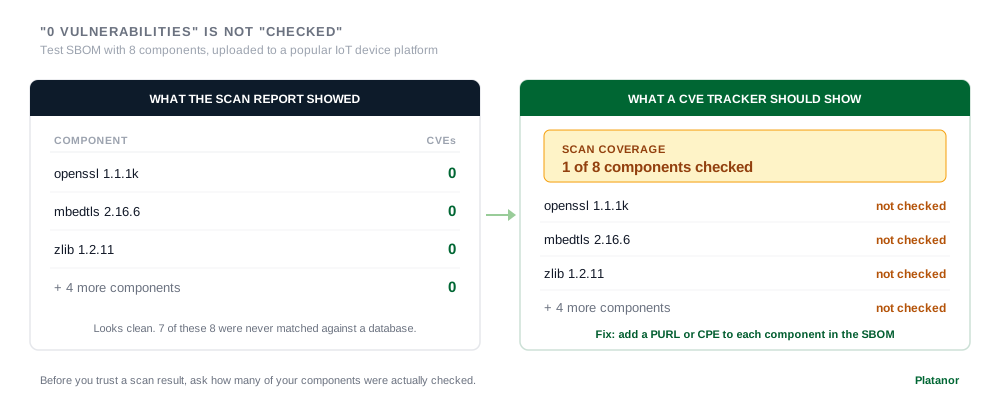
What a tracker has to do here:
- Report coverage, not just results. "1 of 8 components checked" is the number you need to see first.
- Keep "not checked" visibly different from "no vulnerabilities". A dash or a warning, never a zero.
- Tell you how to fix each gap. Usually that means adding an identifier the scanner can match - a PURL or a CPE, depending on the tool - to the component in your SBOM.
If you take one thing from this article, take this: before you trust any scan result, ask how many of your components were actually checked.
4. Same firmware, different exposure
Here is a situation that catches teams out. You ship firmware 4.7.0 to the whole fleet. Half of your devices came from a production batch with bootloader 1.0, the other half from a later batch with bootloader 1.2. A CVE is published for the cryptographic library inside bootloader 1.0.
Every device reports firmware 4.7.0. Half of them are vulnerable.
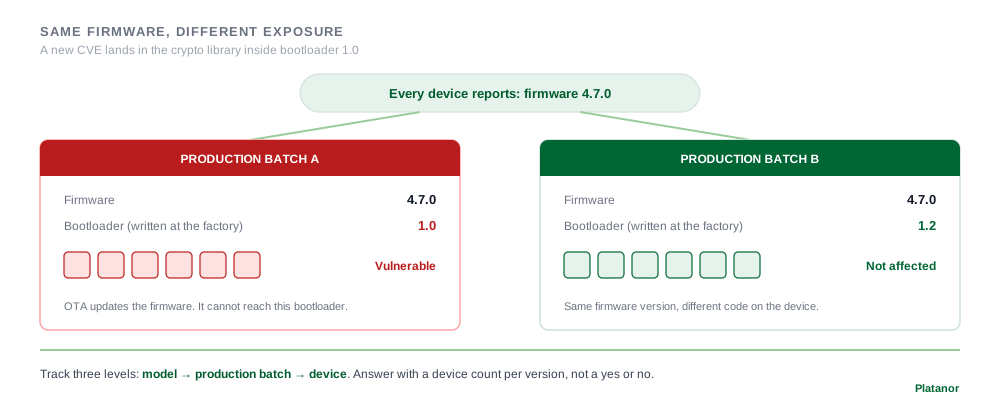
This is why a tracker needs to know more than the firmware version. It needs to know which batch each device came from, what that batch put on it, and what is running on it right now. The EU Cyber Resilience Act (CRA) already requires products to carry a type, batch or serial number. A good tracker uses the same three levels: the model, the production batch, and the individual device.
In practice that means:
- each production batch records the versions of everything that can't be updated in the field, such as the bootloader
- each device belongs to a batch and reports its current versions
- when a CVE lands, the answer is a device count per version, not a yes or no for the whole product
5. Prioritize: CVSS is not enough
Once components are matched, you will usually have more findings than you can fix this week. CVSS tells you how bad a vulnerability could be in theory. It does not tell you how likely it is to be used against you.
Two more signals help:
- KEV, CISA's list of vulnerabilities with confirmed exploitation in the wild. If a CVE in your device is on it, it goes to the top.
- EPSS, a daily probability that a CVE will be exploited in the next 30 days.
A reasonable order: KEV first, then high EPSS, then the rest by CVSS and by whether the vulnerable code can actually be reached on your device. A critical CVSS score in a function your firmware never calls is less urgent than a medium one in your network stack.
6. Triage, and write down why
Not every CVE in a component affects your device. The vulnerable function may not be compiled in, the interface may not be exposed, the feature may be disabled in your configuration. Saying so is fine. Saying so without a reason is not.
Each finding should end up in one of a few states - under investigation, affected, not affected, fixed - and every "not affected" needs a short justification: vulnerable code not present, not reachable, protected by another control. That record is what VEX (Vulnerability Exploitability eXchange) formats are for.
You will be asked about these decisions later: by customers, by the integrators who build your module into their products, and potentially by a market surveillance authority. A dated, written reason is the difference between "we checked" and "we think we checked".
7. When an OTA update can't fix it
Go back to the bootloader example. The fix for the vulnerable library is in bootloader 1.3. But the bootloader on those devices was written at the factory and is never updated in the field. Your OTA pipeline, however good, can't reach it.
Your options are limited:
- Document that the device is not affected, if that is genuinely true for your configuration
- Accept the risk, with the reasoning written down
- Re-flash the devices in a service center, which in practice means a recall or a service campaign
- Withdraw the affected devices, in the worst case
None of these is cheap. This is why the tracker needs to know, for every component, whether it can be updated in the field, only at the factory or service center, or never. And it is why this question belongs in the design phase, before the first device ships: decide what your bootloader can and can't update, and how. Our articles on secure boot and secure OTA updates go into the design side.
8. The cloud is part of your product too
If your device needs a backend to do its job - an app that controls a heater, a dashboard that receives sensor data - that backend is part of the product. Under the CRA, remote data processing that a manufacturer designs or has designed for the device counts as part of the product when, without it, the device couldn't perform one of its functions - controlling a smart home device from a phone is the standard example. It is not treated as a separate service. Its vulnerabilities belong in the same picture as the firmware's.
It behaves differently, though. Firmware versions live on devices for years. The backend has one version in production, and it changes all the time. For tracking, that means the current backend version counts for every release, and when you deploy a new one, the status of every release that depends on it should update with it.
9. Connect findings to releases and devices
All of the above only becomes useful when it rolls up to two numbers:
- The status of each release. A release is as weak as its weakest component - including every bootloader version it is allowed to run on. Show the worst finding, with a breakdown by component, so it is obvious why the release is red.
- The number of devices affected. For every open finding, how many devices in the field are running a vulnerable version right now.
The same link works in the other direction. A release with a component that has no SBOM should be flagged before it ships, not discovered after.
10. When a CVE becomes a reporting obligation
Since 11 September 2026, if a vulnerability in a product you sell in the EU is actively exploited, you have to report it: an early warning within 24 hours of becoming aware of it, a fuller notification within 72 hours, and a final report within 14 days after a fix or mitigation is available. This covers devices already on the market, not only new ones. Our Article 14 guide explains the process.
The tracker doesn't do the reporting for you, but without it you won't meet the clock. Twenty-four hours is not enough time to find out which of your products contain the affected library.
Does your CVE tracking cover this?
- An SBOM for every version of every component, including the bootloader and the radio module
- Automatic re-checking of every version still in the field, with the date of the last check
- Scan coverage you can see, with "not checked" never shown as zero
- The batch and current versions of every device
- Prioritization that uses KEV and EPSS, not only CVSS
- A triage decision with a written reason for every finding
- A plan for components that can't be updated in the field
- The cloud backend in the same picture as the firmware
- Release status and affected device counts for every open finding
- A path from a finding to a 24-hour early warning and a 72-hour notification, if the vulnerability is actively exploited
If you are designing a device now and want this to work from the first production batch, talk to us. If you want to see where your product stands today, the CRA Readiness Check is free and takes 20-40 minutes.
FAQ
What is a CVE tracker? A process, usually supported by a tool, that keeps matching the components in each of your software or firmware versions against newly published vulnerabilities and tells you which versions and devices are affected. The key word is "keeps": it runs continuously for as long as the versions are in use.
What does a CVE tracker mean for an IoT manufacturer specifically? Tracking per component version rather than per product, knowing which batch and versions each device has, and planning for components that can't be updated in the field. Web-focused tools usually assume one version in production; a device fleet never has that.
How often should firmware be checked for new CVEs? Continuously, or at least daily, for every version still running on devices. New CVEs and new exploitation data are published every day.
Why does my scanner show 0 vulnerabilities for a component I know is outdated? Most likely it couldn't identify the component. Without a PURL or CPE the scanner can't match it against vulnerability databases, and some tools show that as zero. Check whether the component was actually scanned.
Can a bootloader vulnerability be fixed with an OTA update? Only if your bootloader is designed to be updatable in the field. Many are written once at the factory. In that case the options are documenting that you are not affected, accepting the risk with a reason, a service campaign, or withdrawal.
Sources: CRA Regulation (EU) 2024/2847 - Article 3(1)-(2) and Recitals 11-12 (remote data processing), Article 13(15) (type, batch or serial number), Article 14 (reporting), Annex I Part II; CISA Known Exploited Vulnerabilities catalog; FIRST, EPSS and CVSS; Package URL specification; NIST, CPE.
Denys Zaliznyak is the CTO of Platanor. Platanor builds secure firmware and device security architecture for IoT and hardware manufacturers.